Submittal Module — Overview
The Submittal module lets project members submit documents for formal review and disposition — shop drawings, specifications, method statements, samples, and similar — track them through a review cycle involving a coordinating reviewer and, optionally, third-party approvers, and maintain a revision history as items are resubmitted or superseded.
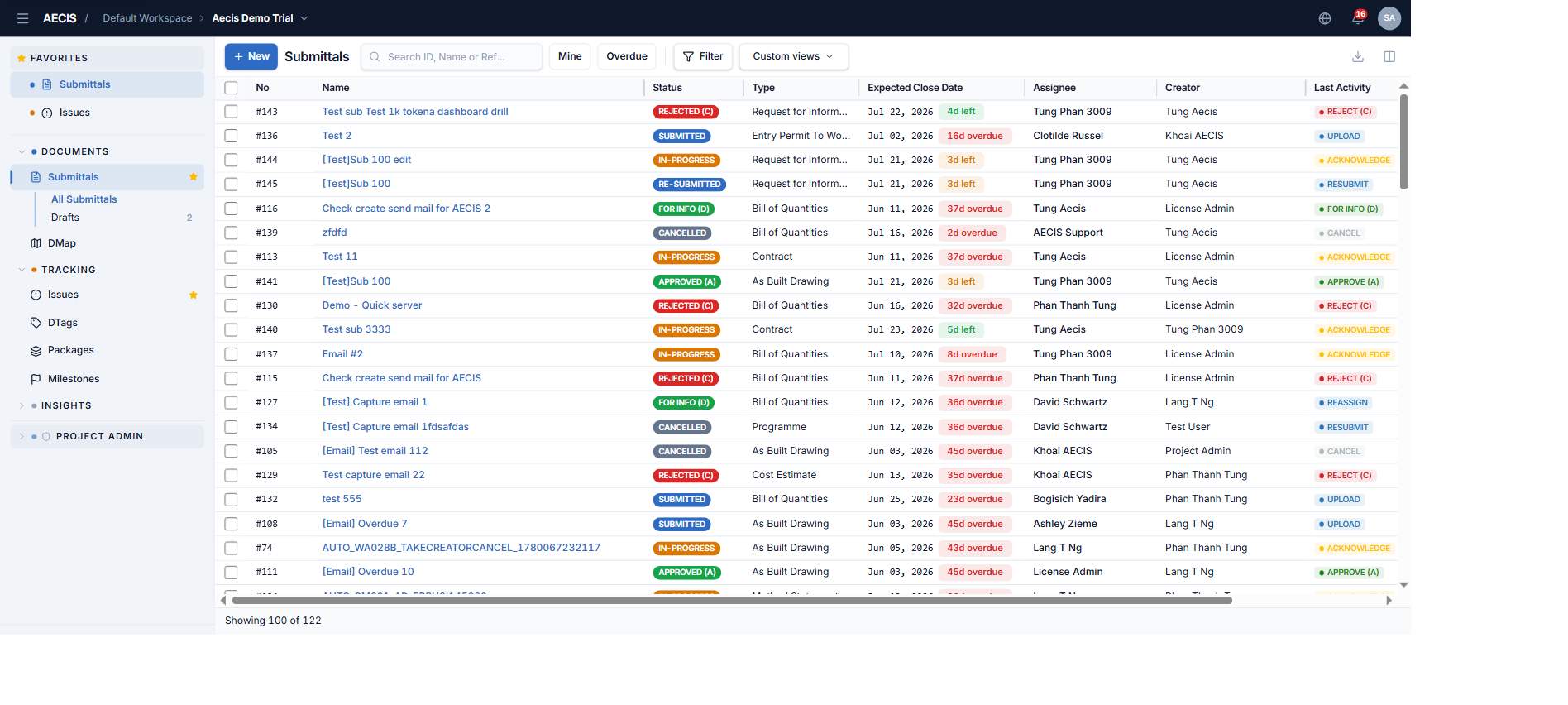
You will find it in the Documents group of the navigation sidebar, alongside DMap.
Key concepts
| Term | Meaning |
|---|---|
| Submittal | A document (or set of documents) submitted for formal review and disposition |
| Creator | The person who submits the item (the "Submitter") |
| Assignee | The coordinating reviewer/approver responsible for the submittal |
| Third-Party Approver | External reviewers the Assignee routes the submittal to; their input is advisory only and never changes the status |
| Disposition | The review outcome: Approved (A), Approved (B) (with comments), Rejected (C), or For Info (D) |
| Revision | A resubmission (after Rejected) or a Supersede (after Approved/For Info) creates a new linked record in the revision chain |
| Document Ref. No. | System-generated reference for the document set (never user-entered) |
| Submitter Ref. No. | Optional reference the Creator enters (e.g. the subcontractor's own number) |
| Stamp QR | An optional QR-code review stamp applied when approving or marking For Info |
| Lifecycle filter | Groups statuses into Inactive / Active / Closed for quick navigation |
Submittal lifecycle
Every submittal is always in exactly one of these statuses:
| Status | Meaning | Color |
|---|---|---|
| Draft | Being prepared by the Creator, not yet submitted | ⚪ Light slate |
| Submitted | Sent for review, not yet opened by the Assignee | 🔵 Blue |
| Re-Submitted | Resent after a Rejected disposition | 🔵 Blue |
| In-Progress | Under active review | 🟠 Amber |
| Approved (A) | Fully approved, no conditions | 🟢 Green |
| Approved (B) | Approved with comments / conditions | 🟢 Green |
| Rejected (C) | Returned for correction and resubmission | 🔴 Red |
| For Info (D) | Reviewed for information only | 🟢 Green |
| Cancelled | Withdrawn without a review outcome | ⬛ Dark slate |
| Superseded | Replaced by a newer revision | ⬛ Dark slate |
A typical lifecycle: the Creator prepares a Draft and submits it (→ Submitted) → the moment the Assignee first opens it, it automatically moves to In-Progress (recorded as an Acknowledge activity) → the Assignee records the disposition: Approved (A/B), Rejected (C), or For Info (D). If rejected, the Creator corrects the documents and Resubmits (→ Re-Submitted), and the review cycle repeats. An approved submittal can later be replaced through Resubmit & Supersede (the original becomes Superseded). At any time before a closing disposition, the submittal can be Cancelled.
Overdue indicator
A submittal is flagged Overdue when its Expected Close Date has passed and it is still awaiting resolution — that is, while it is Submitted, Re-Submitted, In-Progress, or Rejected (C). The indicator is computed automatically and appears next to the date in the list: days late in red (e.g. 16d overdue) or time remaining in green (e.g. 3d left). Approved, For Info, Cancelled, and Superseded submittals are never overdue.
Who does what
Two permission layers work together:
- Per-submittal actor groups — the Creator group (submitter + same-organization colleagues), the Assignee group (coordinating reviewer + colleagues), the Third-Party group (people on the Issue-To list + colleagues), and Administrators (all three). Users in none of these see only Take Creator / Take Approver. When a user belongs to several groups, precedence is Creator > Assignee > Third-Party.
- Project-level roles (RBAC) — construction roles such as Project Manager, Document Controller, Site Engineer, Contractor, Consultant… gate who can see or edit Submittals in the project at all. Deleting submittals is limited to the Project Manager and Document Controller roles.
See Workflow Actions for the full action-by-status table.