DTag Module — Overview
DTags are the project's hierarchical location/category tags — a tree such as Tower A › Level 10 or Podium Block › Ground Floor › Lobby. Issues and submittals are attached to DTags so they can be located, filtered, and grouped by where they belong in the project structure.
The DTag module manages this tree. You will find it in the Tracking group of the navigation sidebar.
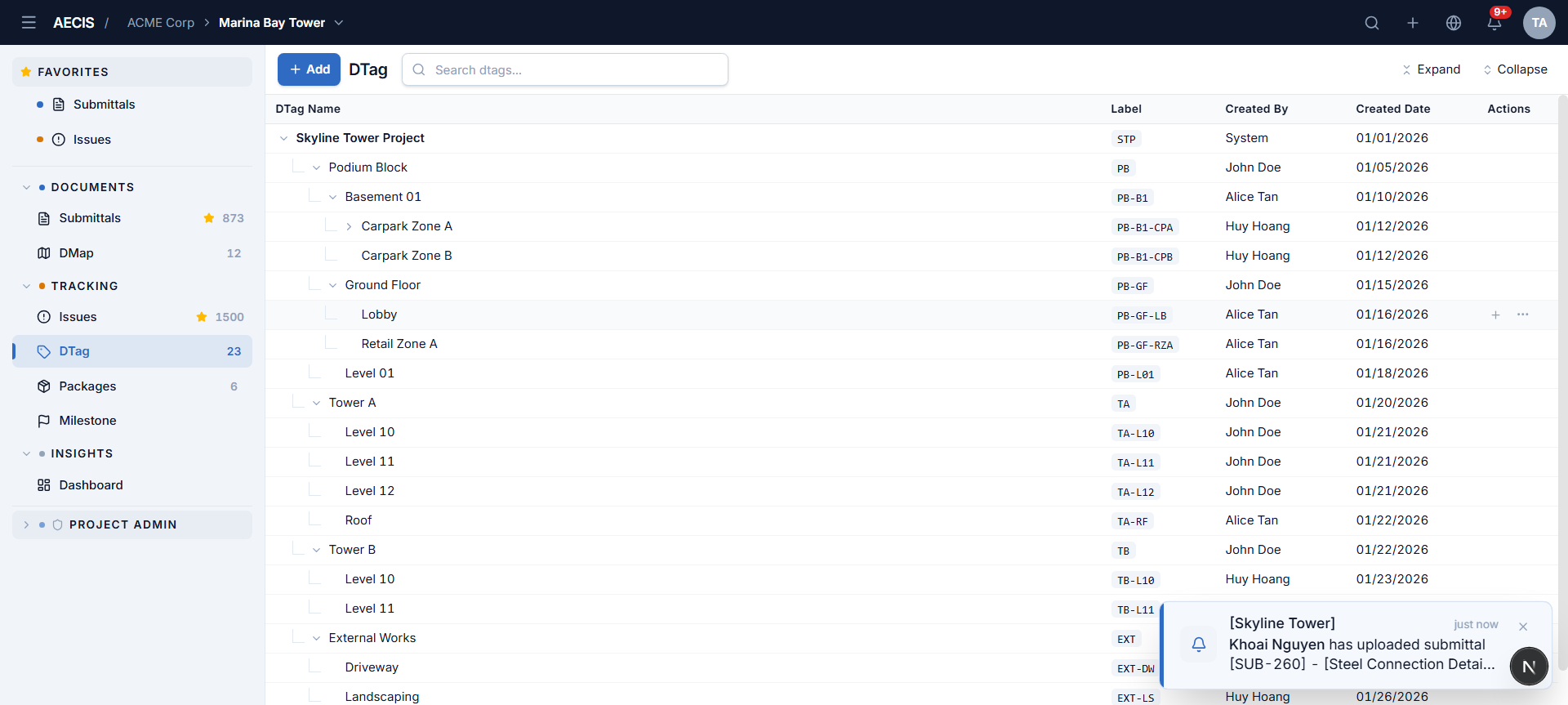
The tree
Each row is one DTag node:
| Column | Meaning |
|---|---|
| DTag Name | The node's name, indented by hierarchy level, with expand/collapse chevrons on parents |
| Label | The node's short code — hierarchical, e.g. PB-GF-LB for Podium Block › Ground Floor › Lobby |
| Created By / Created Date | Who created the node and when |
| Actions | Hover a row to reveal the add (+) and more (⋯) buttons |
Toolbar
- + Add — creates a new root-level DTag (an inline input appears at the bottom of the tree).
- Search — filters the tree by name in real time.
- Expand / Collapse — open or close the whole tree.
Where DTags are used
- Create Issue / Submittal — attach one or more DTags via the tree picker.
- DTags tab in the Issue and Submittal detail panels — view, add, or remove the record's tags, each shown as a breadcrumb path.
- Filters — the Issue and Submittal list filter panels include a DTag condition.
See Managing the Tree for editing operations.