The DMap List
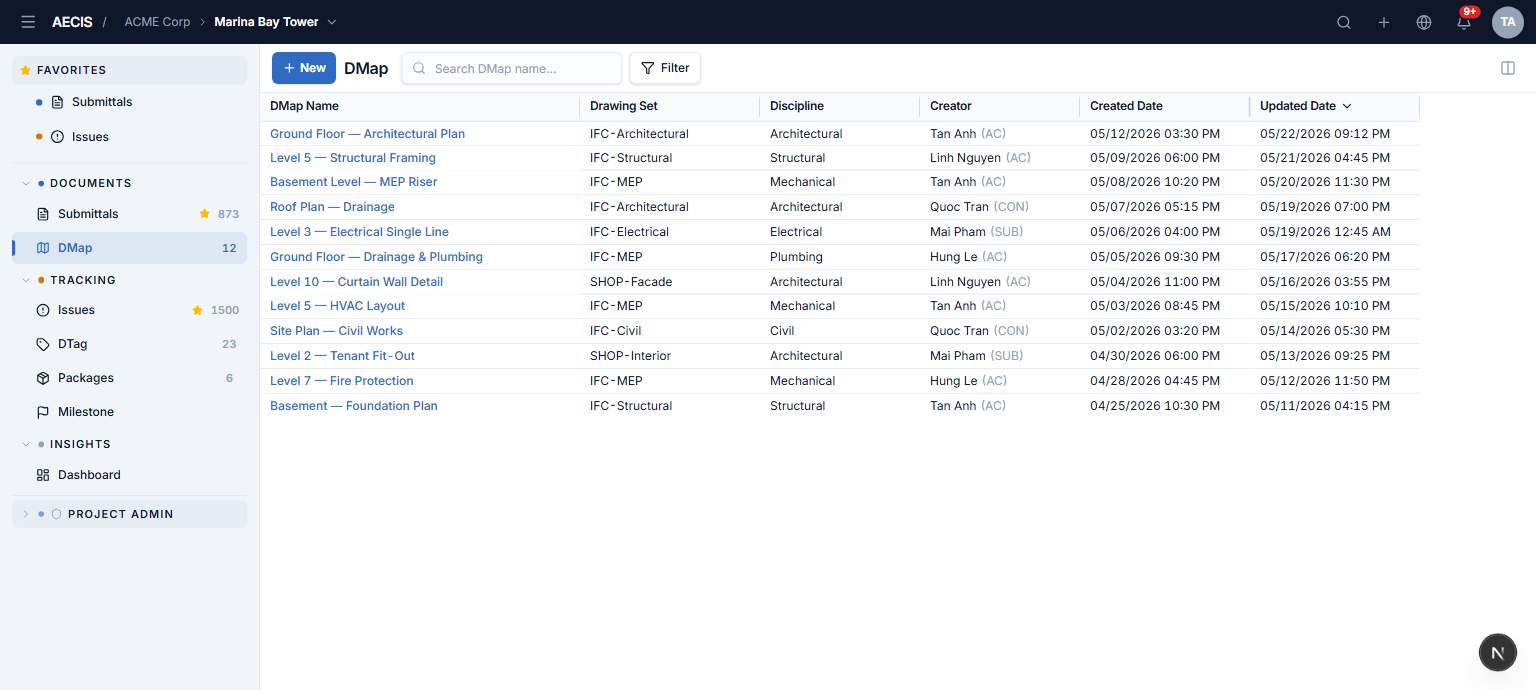
The module entry point: a high-density register of every DMap.
Toolbar
| Control | What it does |
|---|---|
| + New | Opens the Upload panel |
| Search box | Filters in real time by DMap name, drawing set, discipline, and creator at once. Press / anywhere on the page to focus it |
| Filter | Opens the filter panel; a badge shows the number of active conditions |
| Clear all filters | Appears when a condition is active — resets filters and search |
| Manage Columns | Opens the column manager |
The grid
Each row is one DMap. Click the DMap Name to open the viewer.
Default columns: DMap Name (always visible, pinned left), Drawing Set, Discipline, Creator ("Name (ORG)"), Created Date, Updated Date (DD/MM/YYYY HH:mm). The default sort is Updated Date, descending; click any header to cycle ascending → descending → unsorted, or use the header menu for sort/pin/hide. Drag a header's edge to resize.
Filtering
The filter panel slides in from the right with a category rail — Drawing Set, Discipline, Creator — and a searchable checkbox list per category. Changes are staged until you click Apply; the header shows a live "Showing X results" count. Search and facets combine with AND; values within a facet combine with OR.
Column manager
Reorder columns by dragging, toggle visibility, and pin columns to the left. The DMap Name column is locked. Show All / Hide All / Reset shortcuts are provided.
Your column layout, widths, pinning, and sort are remembered in the browser and restored on the next visit.
Processing indicator
Right after an upload, the new row shows a processing indicator while the DMap's PDF is converted to the viewer image. It disappears when conversion completes.