Empty States
The welcome view — brand-new project
When every dataset is empty (no issues, no submittals beyond drafts, no RFIs/NCRs, no milestones, no KPI data), the whole board is replaced by a welcome view:
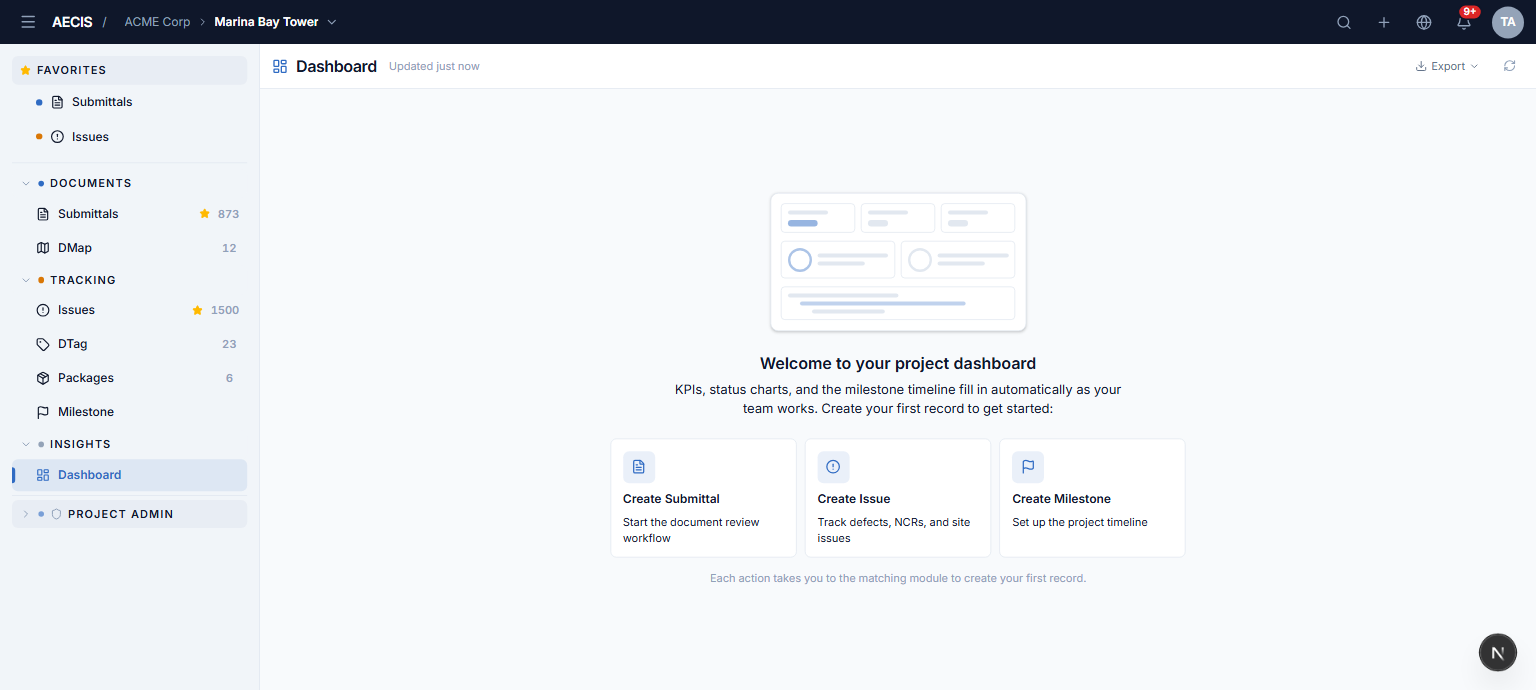
- A ghost illustration previews what the dashboard will look like.
- Three CTA cards — Create Submittal, Create Issue, Create Milestone — each takes you to the matching module to create your first record.
- A CTA for a module you cannot read is shown disabled with a tooltip explaining the missing permission.
Per-widget empty states
When only some datasets are empty, the board stays intact and each empty widget shows a compact in-card placeholder:
- Submittal / Issue chart with no records — "No submittals/issues yet" with a create link; the all-zero stacked bar is hidden.
- Chart emptied by an active filter — the zeroed donut is kept as-is, with no create link (the project has data; the filter simply matched nothing).
- RFI / NCR with no rows — a placeholder with no link (RFIs and NCRs are subsets of submittals/issues, not created directly).
- Milestone timeline with no milestones — a placeholder with a Create Milestone link.
- KPI tiles with no data — the tiles show N/A (this alone never triggers the welcome view).